
We have two environments available for our customers, a staging environment for integration and testing and a production environment. For each environment you will receive different credentials.
| Environment | API Base URL |
|---|---|
| Staging | https://developer.staging.datachecker.nl |
| Production | https://developer.datachecker.nl |
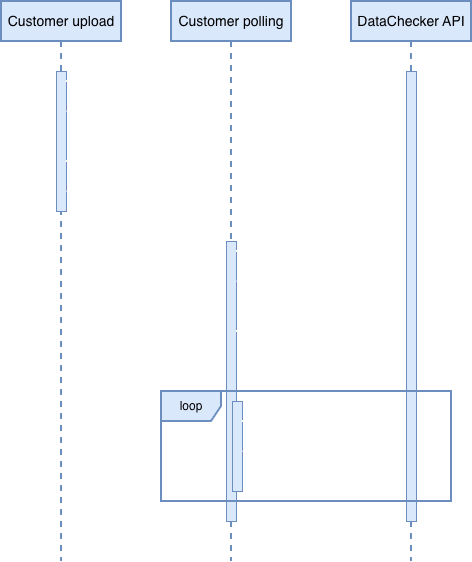
It's recommended that you implement two separate processes. One to handle the upload of the documents and another process that will handle the processing of all the results. The following sequence diagram is an illustration of the processes.
post
/api/v2/secureidlink
This endpoint can be used to create a Secure ID Link.
Parameters
body| Name | Type | Description | |
|---|---|---|---|
body | Required |
Example
| Field | Type | Description | |
|---|---|---|---|
additionalDocuments | array[string] | The user will be asked to capture the additional documents | |
emailAddress | string | The email address of the user that will receive the Secure ID Link | |
communicationModes | array[string] | Possible values are MODE_EMAIL or MODE_SMS [MODE_EMAIL, MODE_SMS, MODE_WHATSAPP] | |
disableCommunication | boolean | When this is set to true, then the link and QR code will be returned in the response. The configured email and sms will not be sent | |
languagePrefix | string | The initial language that will be used on the Secure ID Link and in the communication with the end user. This is the two letter country code in lowercase | |
name | string | The full name of the end user, this will be used in the communication | |
phoneNumber | string | The phone number if the MODE_SMS is used. This should be in the international format | |
enableOneTimePassword | boolean | This can be used to enable the one time password when an end user starts the onboarding process | |
product | string | Possible values are FACE_LINK, IDV_LITE, IDV_STANDARD, IDV_PREMIUM, RTW_STANDARD and RTW_PREMIUM | |
customerReference | string | A field that can be used to add a customer specific reference for this transaction | |
userId | string | A valid userId for a user that is defined for your account | |
whatsappPhoneNumber | string | The phone number for sending a Whatsapp message | |
linkedTransactionId | string | Required for a FaceLink request; the transactionID of the original IDV_PREMIUM or RTW_PREMIUM request | |
rtwType | string | The RTW ruleset that should be applied for the transaction. Possible values: RTW_NL, RTW_BE, RTW_DE, RTW_UK |
Responses
200- A successful response.
| Field | Type | Description | |
|---|---|---|---|
link | string | The link for the Secure ID Link, this will only be returned if the disableCommunication option is set to true | |
secureId | string | The unique ID for the link | |
transactionId | string | The unique ID for the transaction, this ID is used in the polling and in the final result | |
qrCode | string | A base64 encoded image of a QR code that contains the Secure ID Link. This will only be returned if the disableCommunication option is set to true | |
communicationsResponse | array[object] | An array of objects that will indicate if the message has been sent. The delivery of the message could still fail, this can take several minutes | |
communicationsResponse.communicationMode | string | Possible values are: MODE_SMS or MODE_EMAIL | |
communicationsResponse.status | string | Possible values are: SENT or FAILED | |
whatsappRedirectUrl | string | The redirect url for sending the Whatsapp message |
400- Validation response
default- An unexpected error response.
| Field | Type | Description | |
|---|---|---|---|
code | integer | ||
message | string | ||
details | array[object] |
Additional documents
It is possible to add additional documents to the transactions by adding the additionalDocuments parameter. A special workflow is integrated for the “DRIVING_LICENSE“ as long as this is enabled on your customer settings and the product is RTW_STANDARD or RTW_PREMIUM.
post
/api/v2/secureidlinks
This endpoint can be used to create multiple secureID links by uploading a csv file.
Parameters
body| Name | Type | Description | |
|---|---|---|---|
body | Required | Request to create multiple secureID links. |
Example
| Field | Type | Description | |
|---|---|---|---|
file | Required | string | The file should be a base64 encoded, semicolon delimited CSV file with the following columns: name, emailAddress, phoneNumber, language, customerReference |
product | Required | string | Possible values: IDV_LITE, IDV_STANDARD, IDV_PREMIUM, RTW_STANDARD and RTW_PREMIUM |
Responses
200- A successful response.
| Field | Type | Description | |
|---|---|---|---|
success | boolean | ||
errors | array[object] | ||
errors.message | string | ||
errors.row | integer |
default- An unexpected error response.
| Field | Type | Description | |
|---|---|---|---|
code | integer | ||
message | string | ||
details | array[object] |
post
/api/v2/facequality
This will check if quality of the face image meets the ICAO standard.
Parameters
body| Name | Type | Description | |
|---|---|---|---|
body | Required |
| Field | Type | Description | |
|---|---|---|---|
image | string | A base64 image | |
customerReference | string | A field that can be used to add a customer specific reference for this transaction |
Responses
200- Technical reject
default- An unexpected error response.
| Field | Type | Description | |
|---|---|---|---|
code | integer | ||
message | string | ||
details | array[object] |
post
/api/v2/faceverify
The FaceVerify endpoint can be called with a POST request to upload the selfie challenges that are created by the FACE_VERIFY SDK.
Parameters
body| Name | Type | Description | |
|---|---|---|---|
body | Required |
Example
| Field | Type | Description | |
|---|---|---|---|
transactionId | Required | string | The transactionId that is retrieved when creating the SDK Token |
images | Required | array[object] | A list of images. One compare image and multiple live images are required. The live images are created by the FACE_VERIFY SDK |
images.data | Required | string | A base64 string of the image |
images.type | string | The type of image. Possible values: ADDITIONAL, BSN_STATEMENT, COMPARE, DRIVING_LICENSE, IDENTITY_CARD, LIVE, PAPER, PASSPORT, PAYROLL_TAX_STATEMENT, PORTRAIT, RESIDENCE_PERMIT, RTW_DOCUMENT, SIGNATURE, WORK_PERMIT | |
images.additionalDocumentType | string | Mapping for ADDITIONAL or PAPER type documents | |
images.customerReference | string | A field that can be used to add a customer specific reference for this image |
Responses
200- A successful response.
| Field | Type | Description | |
|---|---|---|---|
success | boolean |
400- Not enough live photos
default- An unexpected error response.
| Field | Type | Description | |
|---|---|---|---|
code | integer | ||
message | string | ||
details | array[object] |
post
/api/v2/idverify
The IDVerify endpoint can be called with a POST request to upload the identity document for an IDV_LITE or IDV_STANDARD product. If you want to verify if the person is allowed to work, then you can upload the identity document together with a BSN Statement and/or a TWV document, as a product you can set RTW_STANDARD.
Parameters
body| Name | Type | Description | |
|---|---|---|---|
body | Required |
Example
| Field | Type | Description | |
|---|---|---|---|
transactionId | string | Optional, the transactionId that is retrieved when creating the SDK Token | |
product | Required | string | Possible values: IDV_LITE, IDV_STANDARD and RTW_STANDARD |
images | Required | array[object] | A list of images |
images.data | Required | string | A base64 string of the image |
images.type | string | The type of image. Possible values: ADDITIONAL, BSN_STATEMENT, COMPARE, DRIVING_LICENSE, IDENTITY_CARD, LIVE, PAPER, PASSPORT, PAYROLL_TAX_STATEMENT, PORTRAIT, RESIDENCE_PERMIT, RTW_DOCUMENT, SIGNATURE, WORK_PERMIT | |
images.additionalDocumentType | string | Mapping for ADDITIONAL or PAPER type documents | |
images.customerReference | string | A field that can be used to add a customer specific reference for this image | |
customerReference | string | A field that can be used to add a customer specific reference for this transaction | |
userId | string | A valid userId for a user that is defined for your account | |
rtwType | string | The RTW ruleset that should be applied for the transaction. Possible values: RTW_NL, RTW_BE, RTW_DE, RTW_UK |
Responses
200- A successful response.
| Field | Type | Description | |
|---|---|---|---|
transactionId | string | The unique ID for the transaction, this ID is used in the polling and in the final result |
400- Images are smaller than 640 x 480 pixels
default- An unexpected error response.
| Field | Type | Description | |
|---|---|---|---|
code | integer | ||
message | string | ||
details | array[object] |
Additional documents
It is possible to add additional documents to the transactions by supplying the “ADDITIONAL“ type to the image. The driving license check is integrated for the combination of the “ADDITIONAL“ type and the “DRIVING_LICENSE“ additionalDocumentType as long as this is enabled on your customer settings and the product is RTW_STANDARD.
post
/api/v2/oauth/token
Get an OAuth token to provide authorization for follow-up requests. The ClientID and ClientSecret can be submitted with Basic Auth, the scopes are send in the body.
Parameters
body| Name | Type | Description | |
|---|---|---|---|
body | Required | The request to retrieve an OAuth token. |
Example
| Field | Type | Description | |
|---|---|---|---|
scopes | Required | array[string] |
Responses
200- A successful response.
| Field | Type | Description | |
|---|---|---|---|
accessToken | string | ||
expiresIn | string | ||
tokenType | string |
401- An unauthorized response.
default- An unexpected error response.
| Field | Type | Description | |
|---|---|---|---|
code | integer | ||
message | string | ||
details | array[object] |
get
/api/v2/poll
Once the documents are uploaded, you can start calling the polling endpoint with a GET request to see if a result is available. The preferred way to do this is to have a separate polling workflow that will check the results of all your transactions every 60 seconds. If you have not retrieved the polling record or the result within your data retention settings, then the data will be removed.
Responses
200- A successful response.
| Field | Type | Description | |
|---|---|---|---|
results | array[object] | ||
results.resultId | string | The unique ID that can be used to retrieve the data from the result endpoint | |
results.transactionId | string | The unique ID of the transaction, this ID is also returned when the transaction was created | |
results.product | string | The product of the transaction | |
results.customerReference | string | The reference that was supplied when the transaction was created | |
results.completed | string | The UTC timestamp on which the transaction was completed | |
results.userId | string | The userId which is used to request the transaction |
default- An unexpected error response.
| Field | Type | Description | |
|---|---|---|---|
code | integer | ||
message | string | ||
details | array[object] |
post
/api/v2/quality
This will check the quality of the images to see if they are good enough to process.
Parameters
body| Name | Type | Description | |
|---|---|---|---|
body | Required |
| Field | Type | Description | |
|---|---|---|---|
images | array[string] | A list of base64 images |
Responses
200- A successful response.
| Field | Type | Description | |
|---|---|---|---|
result | string | The overall result of all the images [UNKNOWN, APPROVED, DISAPPROVED, TECHNICAL_REJECT] | |
message | string | The optional message when the quality is not approved |
default- An unexpected error response.
| Field | Type | Description | |
|---|---|---|---|
code | integer | ||
message | string | ||
details | array[object] |
get
/api/v2/result/{resultId}
You can use the resultId of the polling or webhook result to retrieve the data by calling this endpoint with a GET request. When you have successfully retrieved the result, the the corresponding record in the polling result will be removed. You will still be able to retrieve the result with the provided resultId as long as the data is available (depending on your data retention settings).
Parameters
path| Name | Type | Description | |
|---|---|---|---|
resultId | Required | string |
Responses
200- A successful response.
| Field | Type | Description | |
|---|---|---|---|
transactionId | string | The unique ID of the transaction | |
customerReference | string | The reference that was supplied when the transaction was created | |
faceVerify | object | Only included for the transactions started with the faceverify endpoint or for the premium products | |
faceVerify.result | string | The result of the face verification [UNKNOWN, APPROVED, DISAPPROVED, TECHNICAL_REJECT] | |
faceVerify.messages | array[string] | A list of messages when the result is DISAPPROVED or TECHNICAL_REJECT | |
faceVerify.customerReferences | array[string] | A list of customer references that refer to the images that are used for this result object | |
identity | object | Included in all the calls to the idverify endpoint | |
identity.result | string | The result of the identity verification [UNKNOWN, APPROVED, DISAPPROVED, TECHNICAL_REJECT] | |
identity.messages | array[string] | A list of messages when the result is DISAPPROVED or TECHNICAL_REJECT | |
identity.data | object | The data that is extracted from the identification document | |
identity.data.name | object | ||
identity.data.name.fullname | string | ||
identity.data.name.givenNames | string | ||
identity.data.name.surname | string | ||
identity.data.dateOfBirth | string | Date, "yyyy-MM-dd" | |
identity.data.dateOfIssuance | string | Date, "yyyy-MM-dd" | |
identity.data.dateOfExpiry | string | Date, "yyyy-MM-dd" | |
identity.data.documentType | string | ||
identity.data.documentSubType | string | ||
identity.data.documentNumber | string | ||
identity.data.gender | string | ||
identity.data.issuingStateOrOrganization | string | ||
identity.data.nationality | string | ||
identity.data.personalGovernmentId | string | ||
identity.data.placeOfBirth | string | ||
identity.data.residencePermitType | string | Optional, only available for residence permits | |
identity.data.mrzLines | array[string] | ||
identity.documentValidation | object | The checked security features of the identification document, each field can contain these values: APPROVED, NOT_APPLICABLE | |
identity.documentValidation.backgroundPrint | string | ||
identity.documentValidation.font | string | ||
identity.documentValidation.hologram | string | ||
identity.documentValidation.lamination | string | ||
identity.documentValidation.mrzFont | string | ||
identity.documentValidation.opticallyVariableInk | string | ||
identity.documentValidation.perforation | string | ||
identity.documentValidation.photoIntegration | string | ||
identity.documentValidation.stamps | string | ||
identity.verifications | object | The result of additional verifications, e.g. the check against sanction lists | |
identity.verifications.sanctionList | object | The sanction list check | |
identity.verifications.sanctionList.result | string | The result of the sanction list check [UNKNOWN, APPROVED, DISAPPROVED, TECHNICAL_REJECT] | |
identity.verifications.sanctionList.foundOnLists | array[string] | If the value of the field above is HIT, this will list the sanction lists on which the person was found | |
identity.verifications.sanctionList.verificationResult | string | The result of the sanction list check [NOT_EXECUTED, HIT, NO_HIT] | |
identity.verifications.lostAndStolen | object | The lost and stolen check | |
identity.verifications.lostAndStolen.messages | array[string] | If the result of this check is HIT, this field will list the reason(s) why | |
identity.verifications.lostAndStolen.verificationResult | string | The result of the lost and stolen check [NOT_EXECUTED, HIT, NO_HIT] | |
identity.customerReferences | array[string] | A list of customer references that refer to the images that are used for this result object | |
rightToWork | object | This is only included if a RTW product is requested | |
rightToWork.result | string | The result of the right to work verification [UNKNOWN, APPROVED, DISAPPROVED, TECHNICAL_REJECT] | |
rightToWork.messages | array[string] | A list of messages when the result is DISAPPROVED or TECHNICAL_REJECT | |
rightToWork.data | object | The data that is extracted from the right to work documents | |
rightToWork.data.vsFromDate | string | Date, "yyyy-MM-dd" (RTW_NL) | |
rightToWork.data.vsDueDate | string | Date, "yyyy-MM-dd" (RTW_NL) | |
rightToWork.data.twvFromDate | string | Date, "yyyy-MM-dd" (RTW_NL) | |
rightToWork.data.twvDueDate | string | Date, "yyyy-MM-dd" (RTW_NL) | |
rightToWork.data.personalGovernmentId | string | (RTW_NL) | |
rightToWork.data.attachmentDueDate | string | Date, "yyyy-MM-dd" (RTW_BE) | |
rightToWork.data.vignetteDueDate | string | Date, "yyyy-MM-dd" (RTW_UK) | |
rightToWork.data.conditions | string | (RTW_UK) | |
rightToWork.data.details | string | (RTW_UK) | |
rightToWork.data.endDate | string | Date, "yyyy-MM-dd" | |
rightToWork.data.dueDate | string | Date, "yyyy-MM-dd" | |
rightToWork.data.startDate | string | Date, "yyyy-MM-dd" | |
rightToWork.data.employmentRemark | string | (RTW_NL) | |
rightToWork.rtwType | string | The type of right to work rules that are applied | |
rightToWork.customerReferences | array[string] | A list of customer references that refer to the images that are used for this result object | |
payrollTaxStatement | object | This is only included if a single payroll tax statement has been uploaded | |
payrollTaxStatement.result | string | The result of the payroll tax statement verification [UNKNOWN, APPROVED, DISAPPROVED, TECHNICAL_REJECT] | |
payrollTaxStatement.messages | array[string] | A list of messages when the result is DISAPPROVED or TECHNICAL_REJECT | |
payrollTaxStatement.data | object | This is only included if a single payroll tax statement has been uploaded | |
payrollTaxStatement.data.personalGovernmentIdPresent | boolean | ||
payrollTaxStatement.data.signDatePresent | boolean | ||
payrollTaxStatement.data.nameAddressResidencePresent | boolean | ||
payrollTaxStatement.data.signaturePresent | boolean | ||
payrollTaxStatement.data.applyPayrollTax | boolean | ||
payrollTaxStatement.data.payrollTaxDate | string | Date, "yyyy-MM-dd" | |
payrollTaxStatement.data.signDate | string | Date, "yyyy-MM-dd" | |
payrollTaxStatement.data.personalGovernmentId | string | ||
payrollTaxStatement.inputData | object | This is only included when input data is provided | |
payrollTaxStatement.inputData.applyPayrollTax | boolean | ||
payrollTaxStatement.inputData.city | string | ||
payrollTaxStatement.inputData.houseNumber | string | ||
payrollTaxStatement.inputData.payrollTaxDate | string | ||
payrollTaxStatement.inputData.postalCode | string | ||
payrollTaxStatement.inputData.street | string | ||
payrollTaxStatement.inputData.houseNumberAddition | string | ||
payrollTaxStatement.inputData.country | string | ||
payrollTaxStatement.inputData.addressInNld | boolean | ||
payrollTaxStatement.inputData.bsn | string | ||
payrollTaxStatement.inputData.dateOfBirth | string | ||
payrollTaxStatement.inputData.fullname | string | ||
payrollTaxStatement.inputData.nationality | string | ||
payrollTaxStatement.customerReferences | array[string] | A list of customer references that refer to the images that are used for this result object | |
result | string | The overall result of the transaction [UNKNOWN, APPROVED, DISAPPROVED, TECHNICAL_REJECT] | |
messages | array[string] | A list of messages when the result is DISAPPROVED or TECHNICAL_REJECT | |
images | array[object] | A list of images | |
images.data | string | A base64 string of the image | |
images.documentType | string | The type of image. Possible values are BSN_STATEMENT, COMPARE, DRIVING_LICENSE, IDENTITY_CARD, LIVE, PAPER, PASSPORT, PORTRAIT, RESIDENCE_PERMIT, RTW_DOCUMENT, SIGNATURE, WORK_PERMIT | |
images.metadata | object | ||
images.pageType | string | The page type of the image. Possible values are FRONT, BACK, RESIDENCE_PERMIT_STICKERS, ANY | |
images.customerReference | string | The reference for the image that was supplied when the transaction was created | |
files | array[object] | A list of files | |
files.data | string | A base 64 string of the file | |
files.documentType | string | The type of the file. Possible value is TRANSACTION_REPORT or PAYROLL_TAX_STATEMENT | |
drivingLicense | object | Only included if the driving license check is applied | |
drivingLicense.result | string | The result of the driving license check [UNKNOWN, APPROVED, DISAPPROVED, TECHNICAL_REJECT] | |
drivingLicense.messages | array[string] | A list of messages when the result is DISAPPROVED or TECHNICAL_REJECT | |
drivingLicense.data | object | The data that is extracted from the driving license | |
drivingLicense.data.name | object | Name object | |
drivingLicense.data.name.fullname | string | ||
drivingLicense.data.name.givenNames | string | ||
drivingLicense.data.name.surname | string | ||
drivingLicense.data.dateOfBirth | string | Date, "yyyy-MM-dd" | |
drivingLicense.data.dateOfIssuance | string | Date, "yyyy-MM-dd" | |
drivingLicense.data.dateOfExpiry | string | Date, "yyyy-MM-dd" | |
drivingLicense.data.documentNumber | string | ||
drivingLicense.data.issuingStateOrOrganization | string | ||
drivingLicense.data.personalGovernmentId | string | ||
drivingLicense.data.placeOfBirth | string | ||
drivingLicense.data.class | string | ||
drivingLicense.data.classes | array[object] | Array of classes containing the name and dateOfExpiry of each class | |
drivingLicense.data.classes.name | string | ||
drivingLicense.data.classes.dateOfExpiry | string | ||
drivingLicense.customerReferences | array[string] | A list of customer references that refer to the images that are used for this result object | |
userId | string | The userId which is used to request the transaction | |
digitalSigning | object | Optional, only available for Digital Signing product | |
digitalSigning.result | string | [UNKNOWN, APPROVED, DISAPPROVED, TECHNICAL_REJECT] | |
digitalSigning.messages | array[string] | ||
digitalSigning.linkedTransactions | array[string] | ||
digitalSigning.customerReferences | array[string] | ||
vog | object | This section is only included if a VOG is requested | |
vog.createdAt | string | The timestamp when the VOG was requested | |
vog.status | string | The status at the time of the VOG request | |
vog.result | string | The result of the VOG verification [UNKNOWN, APPROVED, DISAPPROVED, TECHNICAL_REJECT] | |
vog.messages | array[string] | A list of messages when the result is DISAPPROVED or TECHNICAL_REJECT | |
vog.customerReferences | array[string] | A list of customer references that refer to the images that are used for this result object | |
vog.data | object | The data that was extracted from the uploaded VOG document | |
vog.data.givenNames | string | The given names on the VOG document | |
vog.data.surname | string | The surname on the VOG document | |
vog.data.dateOfBirth | string | The date of birth on the VOG document. Date, "yyyy-MM-dd" | |
vog.data.dateOfIssuance | string | The date the VOG document was issued. Date, "yyyy-MM-dd" | |
vog.data.companyName | string | The name of the organisation the VOG document was issued for | |
vog.data.profiles | array[string] | The screening profiles on the VOG document | |
additionalDocuments | array[object] | Optional, extracted data from additional documents | |
additionalDocuments.additionalDocumentType | string | ||
additionalDocuments.customerReferences | array[string] | ||
additionalDocuments.data | object | ||
additionalDocuments.data.socialSecurityNumber | string | ||
additionalDocuments.data.name | object | ||
additionalDocuments.data.name.fullname | string | ||
additionalDocuments.data.name.givenNames | string | ||
additionalDocuments.data.name.surname | string | ||
additionalDocuments.data.personalGovernmentId | string | ||
additionalDocuments.result | string | The result of the additonal document [UNKNOWN, APPROVED, DISAPPROVED, TECHNICAL_REJECT] | |
additionalDocuments.messages | array[string] | A list of messages when the result is DISAPPROVED or TECHNICAL_REJECT | |
faceLink | object | This section is only included if a FaceLink is requested | |
faceLink.result | string | The result of the FaceLink [UNKNOWN, APPROVED, DISAPPROVED, TECHNICAL_REJECT] | |
faceLink.messages | array[string] | A list of messages when the result is DISAPPROVED or TECHNICAL_REJECT | |
faceLink.customerReferences | array[string] | A list of customer references that refer to the images that are used for this result object | |
faceLink.gpsLocation | object | The GPS location where the FaceLink was performed | |
faceLink.gpsLocation.latitude | number | ||
faceLink.gpsLocation.longitude | number |
404- Result not found response
default- An unexpected error response.
| Field | Type | Description | |
|---|---|---|---|
code | integer | ||
message | string | ||
details | array[object] |
post
/api/v2/facelinkpackage
Retrieve the encrypted FaceLink package for a one-time accept token. The package is deleted server-side after retrieval.
Parameters
body| Name | Type | Description | |
|---|---|---|---|
body | Required |
| Field | Type | Description | |
|---|---|---|---|
token | string | The one-time accept token from the activation link |
Responses
200- A successful response.
| Field | Type | Description | |
|---|---|---|---|
packageData | string | The opaque encrypted FaceLink package | |
transactionId | string | The transaction the package belongs to |
default- An unexpected error response.
| Field | Type | Description | |
|---|---|---|---|
code | integer | ||
message | string | ||
details | array[object] |
get
/api/v2/sdk/token
To be able to use one of our SDK’s, you will need to request a SDK Token to unlock the SDK. A SDK Token can be retrieved by sending a GET request to the /api/v2/sdk/token endpoint. Every transaction requires a new SDK Token.
Parameters
query| Name | Type | Description | |
|---|---|---|---|
numberOfChallenges | integer | The amount of challenges that need to be performed for FACE_VERIFY. The default is 2 | |
customerReference | string | A field that can be used to add a customer specific reference for this transaction | |
validateWatermark | boolean | When this is enabled, then an invisible watermark will be added to the images taken by the FACE_VERIFY SDK. This watermark will be checked when the images are uploaded to the faceverify endpoint | |
services | Required | array[string] | The name of the SDK that you want to unlock [FACE_VERIFY, AUTO_CAPTURE, NFC] |
Responses
200- A successful response.
| Field | Type | Description | |
|---|---|---|---|
token | string | The token | |
transactionId | string | The unique ID for the transaction, this ID is used in the polling and in the final result |
400- Unknown service response
default- An unexpected error response.
| Field | Type | Description | |
|---|---|---|---|
code | integer | ||
message | string | ||
details | array[object] |
post
/api/v2/vog
This endpoint can be used to create a VOG request
Parameters
body| Name | Type | Description | |
|---|---|---|---|
body | Required |
| Field | Type | Description | |
|---|---|---|---|
customerReference | string | A field that can be used to add a customer specific reference for this transaction | |
emailAddress | Required | string | The email address of the user that will receive the Secure ID Link |
givenNames | Required | string | The given names of the person that will request the VOG |
language | Required | string | The initial language that will be used on the Secure ID Link and in the communication with the end user. This is the two letter country code in lowercase |
surname | Required | string | The surname of the person that will request the VOG |
userId | string | A valid userId for a user that is defined for your account | |
vogRequest | Required | object | The object to request a VOG |
vogRequest.companyName | Required | string | The name of the company |
vogRequest.jobTitle | Required | string | The job title |
vogRequest.profiles | Required | array[string] | A list of numbers that correspond to the VOG profiles (https://justis.nl/producten/verklaring-omtrent-het-gedrag/vog-voor-werkgevers-en-organisaties/screeningsprofielen) |
vogRequest.profileType | Required | string | The type of the VOG profile. Possible values: GENERIC, SPECIFIC [GENERIC, SPECIFIC] |
Responses
200- A successful response.
| Field | Type | Description | |
|---|---|---|---|
transactionId | string |
default- An unexpected error response.
| Field | Type | Description | |
|---|---|---|---|
code | integer | ||
message | string | ||
details | array[object] |
get
/api/v2/reasons
Retrieves the list of all auto and manual reject/disapprove reasons
Responses
200- A successful response.
| Field | Type | Description | |
|---|---|---|---|
reasons | array[object] | ||
reasons.key | string | ||
reasons.translations | object |
default- An unexpected error response.
| Field | Type | Description | |
|---|---|---|---|
code | integer | ||
message | string | ||
details | array[object] |
Reject reason reference
Reject reasons that may appear in verification results when a check is disapproved or technically rejected.
Instead of polling for the results we can also configure a result webhook. This will send a POST request with the metadata to a url when the result is ready.
When the SecureIDLink is used to upload the documents, we can send a POST request with the metadata to a url. This webhook can be configured for your account.
To test the different kind of results, you can add a “dc-test” http header to the request of the IDVerify and SecureIDLink endpoints. This will immediately provide a mocked result that will be available at the polling and result endpoint. This is only available on the staging environment.
The content of the mocked result can change when another product is requested.
- IDV products will contain the identity object
- RTW products will also contain the rightToWork object
- PREMIUM products will also contain the faceVerify object (only available on the SecureIDLink endpoint)
| “dc-test” http header value | Result description |
|---|---|
| APPROVED | An approved result will be provided |
| APPROVED_EU | A Polish Passport will be returned |
| APPROVED_NON_EU | A Ukrainian Passport will be returned |
| APPROVED_RP | A Dutch Residence permit will be returned |
| DISAPPROVED | A disapproved result will be provided |
| TECHNICAL_REJECT | A rejected result will be provided |
Do you have questions, please contact the DataChecker product support team. You can send an e-mail to product.support@datachecker.nl.